
NEAR Protocol has solidified its position in 2026 as a leader in blockchain scalability through its unique Nightshade sharding architecture. Unlike traditional Proof-of-Stake networks, NEAR’s staking mechanism is designed for high throughput and developer flexibility, featuring a unique storage staking model alongside traditional delegation. As of early 2026, the network's decentralization continues to grow, with billions in value secured by hundreds of independent validators. The average annual percentage yield (APY) for NEAR typically ranges between 4.1% and 11%, depending on the chosen validator's commission and the total network stake.
For NEAR holders, staking is a dual-purpose strategy: it secures the carbon-neutral network while providing a consistent stream of passive income. Whether you are a developer managing smart contract storage or a retail investor looking for long-term growth, understanding the nuances of NEAR’s 12-hour epochs and 2-day unbonding periods is essential. This guide explores the most effective ways to stake NEAR in 2026, from BingX Earn to hardware wallet integration.
What Is NEAR Protocol Layer-1 Blockchain?
NEAR Protocol is a collective-run, layer-1 blockchain designed to be super-fast, incredibly secure, and infinitely scalable. Launched to provide a user-friendly environment for decentralized applications (dApps), NEAR utilizes Nightshade, a sharding design where individual nodes only process a fraction of the network's transactions. This allows for massive parallelization and low fees. By 2026, NEAR has become a hub for Chain Abstraction, simplifying multi-chain operations so users can interact with various blockchains without managing multiple gas tokens or complex interfaces.
What Is the Role of the NEAR Token in the NEAR Protocol Ecosystem?
NEAR is the native utility token of the protocol, serving three primary functions:
• Network Security: Participants stake NEAR tokens to become validators or delegate to existing ones to earn rewards.
• Transaction Fees: NEAR is used to pay for processing transactions and storing data.
• Governance: Token holders participate in the governance of the ecosystem, voting on protocol upgrades and resource allocation.
What Is NEAR Tokenomics?
The tokenomics include a 5% annual inflation rate, with 90% of those newly minted tokens going to validators and 10% to the protocol treasury. Notably, 70% of all transaction fees are burned, creating a deflationary pressure as network usage increases.
What Is NEAR Staking and How Does It Work?
NEAR staking uses a Proof-of-Stake (PoS) mechanism where Validators maintain the network. Because running a validator node requires significant technical hardware, most users participate via Delegation.
In NEAR’s design, delegation is smart contract-based. Instead of delegating to a public key, you interact with a Staking Pool contract. Each validator deploys their own contract, allowing them to set custom commission fees, averaging 1% to 10%, and reward distribution logic. When you stake, your tokens are locked in these contracts to back the validator's seat on the network.
Key Terms to Know Before Staking NEAR Tokens
• Epoch: A period of approximately 12 hours during which validators are selected and rewards are calculated.
• Seat Price: The minimum amount of NEAR required to become a validator, which fluctuates based on total network stake.
• Storage Staking: A unique NEAR feature where NEAR tokens are locked to pay for the physical data storage of a smart contract at a rate of 1 NEAR per 100KB.
• YoctoNEAR: The smallest unit of NEAR, often used in CLI commands for precision.
Why Stake NEAR Protocol (NEAR) in 2026?
Staking NEAR in 2026 offers more than just yield. With the maturation of NEAR’s sharding phases, the network is now capable of handling millions of users simultaneously. By staking, you are fueling a carbon-neutral ecosystem that powers the next generation of Web3 social media and gaming. Furthermore, NEAR’s liquid staking derivatives have matured, allowing users to earn rewards while simultaneously using their staked assets in DeFi protocols to maximize capital efficiency.
How Much NEAR Do You Need to Start Staking?
• Self-Custody Wallets: There is no protocol-level minimum for delegating to a staking pool, though individual pools may set a small limit, usually 0.1 NEAR.
• Validator Nodes: To run your own node, you must meet the Seat Price, which can be several thousand NEAR.
• BingX Earn: You can often start with as little as 1 NEAR using flexible or fixed term products.
What Are the Top 3 Ways to Stake NEAR in 2026?
NEAR offers multiple avenues for staking, ranging from one-click exchange solutions to advanced command-line interfaces.
1. Stake NEAR Protocol (NEAR) on BingX Earn: Best for Beginners
If you prefer to avoid the technicalities of pinging pools or managing smart contract addresses, BingX Earn is the most efficient choice.
How to Start Staking NEAR on BingX Earn and Earn Attractive APRs
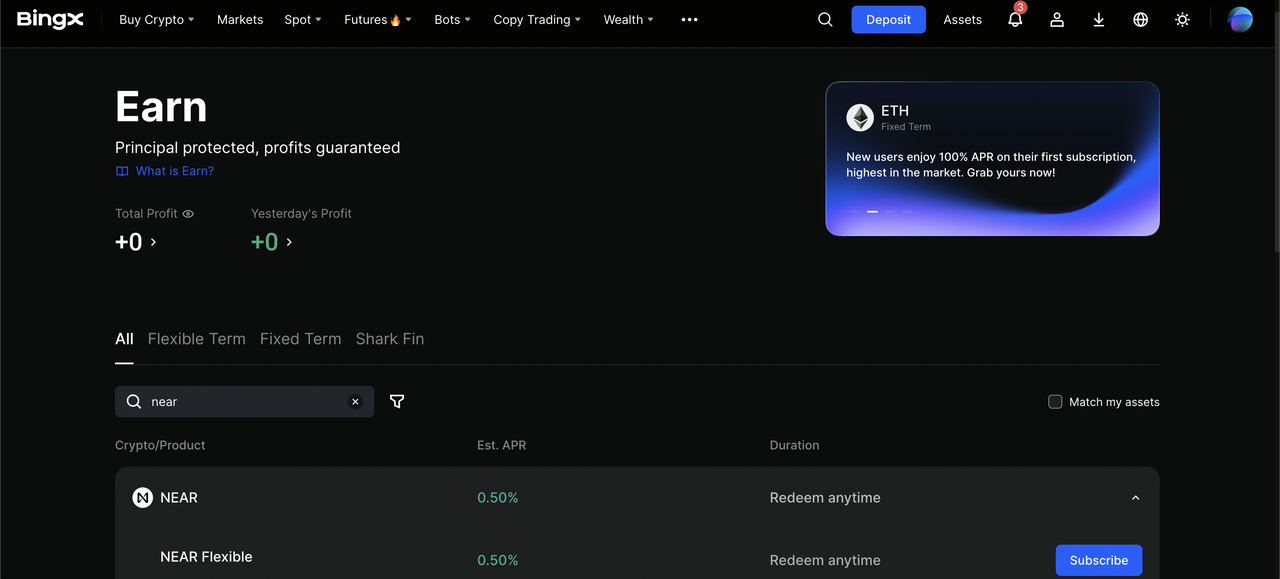
Stake NEAR via BingX Earn for attractive APRs
In 2026, BingX provides an optimized staking experience with competitive yields that often surpass native delegation rates due to institutional-grade validator management.
1. Log in to your BingX account and ensure KYC is complete.
2. Deposit or Buy NEAR on the BingX Spot Market.
3. Navigate to Wealth and Earn.
4. Search for NEAR and select the product that fits your needs, such as Flexible or Fixed.
5. Enter the amount, review the latest APR offers, and click Subscribe.
Note: BingX handles the 2-3 day unbonding period for you in its flexible products, providing faster access to your liquidity compared to native unstaking.
Learn more about how to buy NEAR Protocol (NEAR) on BingX in our comprehensive guide.
2. Native Staking via NEAR Mobile or Web Wallets
For those who want to choose their own validator and support specific community members, using a native wallet is the way to go.
• NEAR Mobile and MyNearWallet: These provide an intuitive interface to browse validators like Everstake with a 6% fee or Allnodes with 0% fee.
• Meteor Wallet: Offers a detailed breakdown of validator performance and uptime.
How to Delegate via NEAR Wallet
1. Purchase NEAR in the BingX Spot Market, then withdraw it to your NEAR wallet address.
2. Click the Staking tab and select Stake My Tokens.
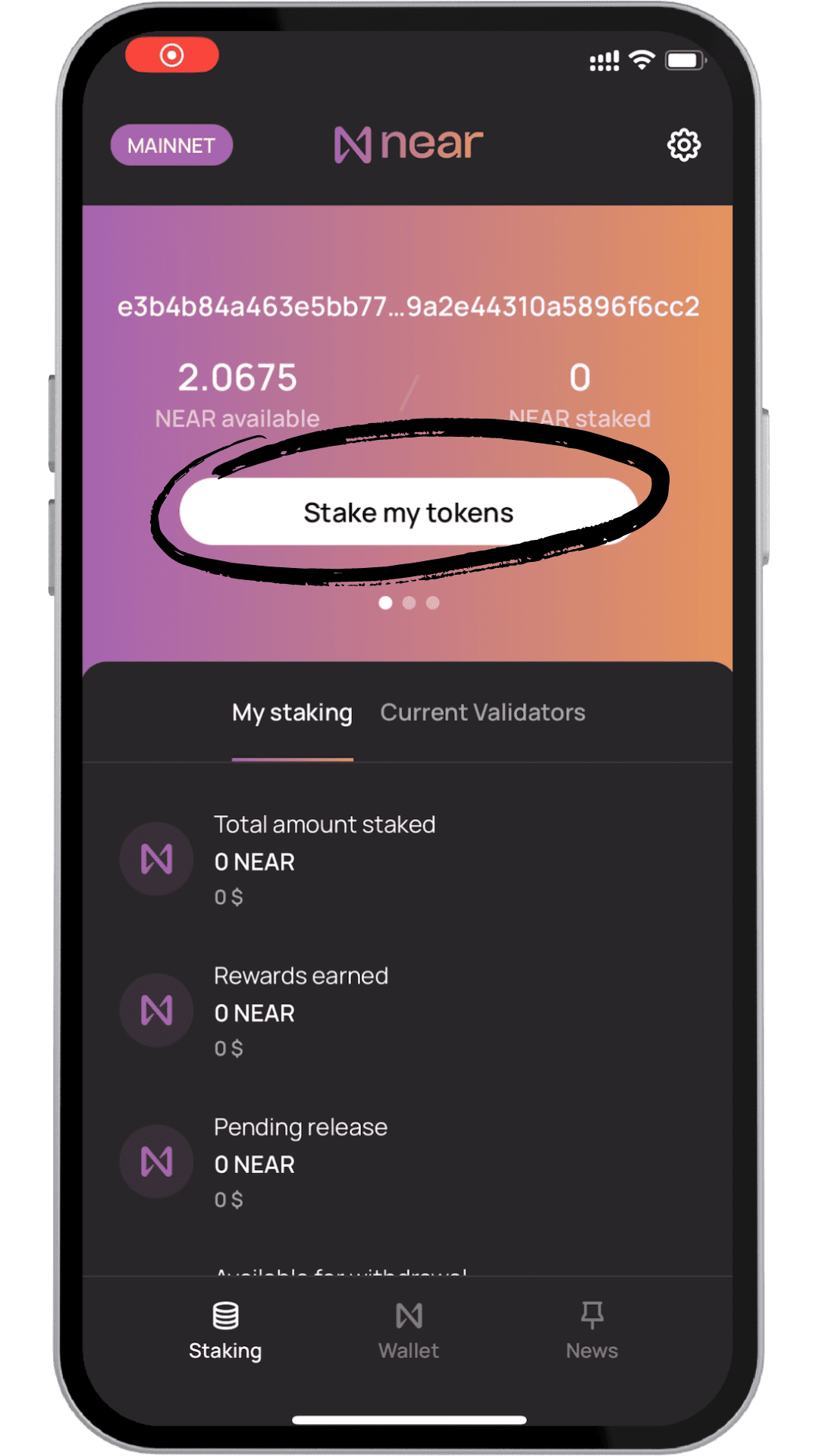
Source: NEAR Mobile Wallet
3. Specify how much NEAR you want to delegate, then tap Next.
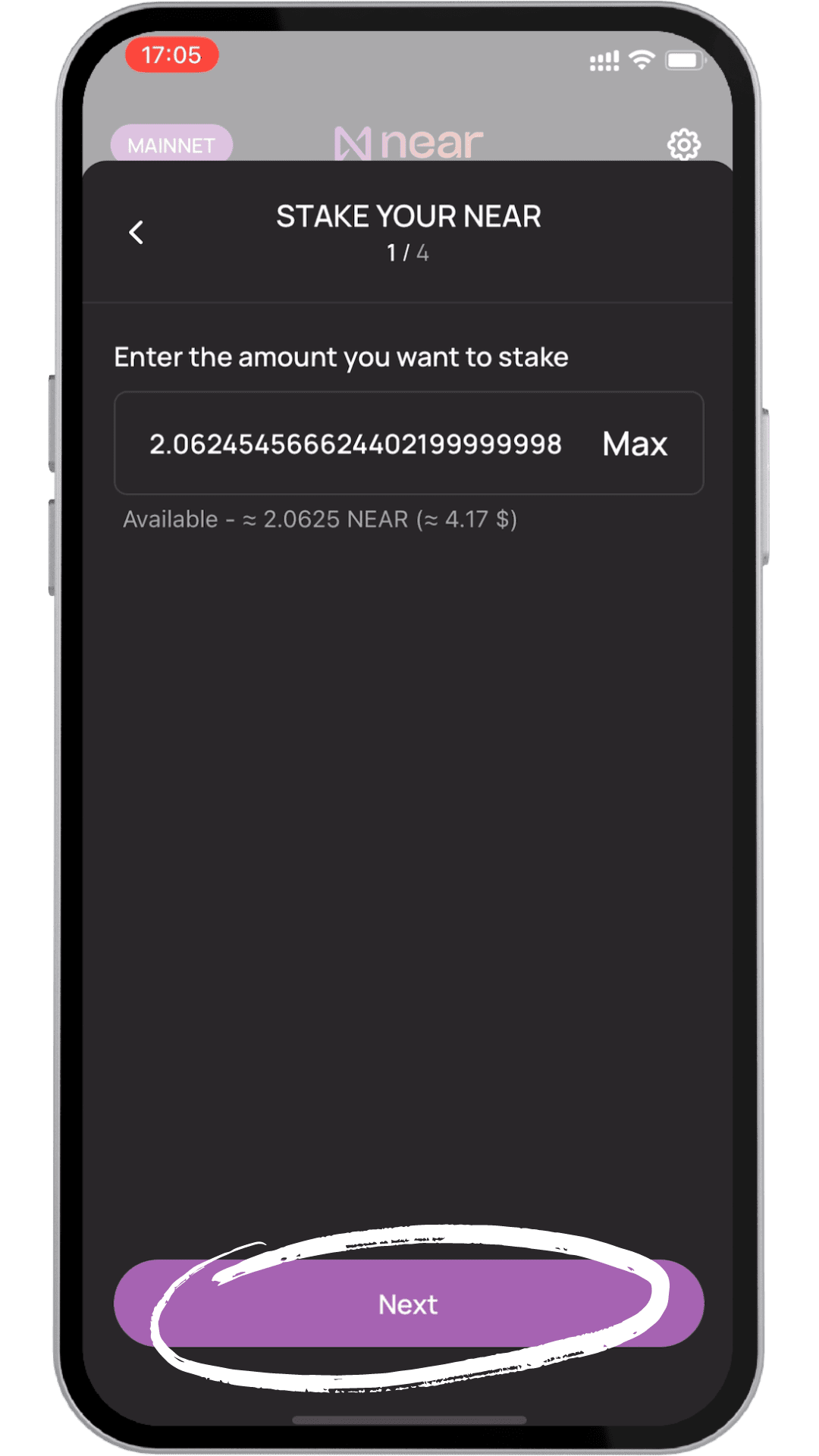
Source: NEAR Mobile Wallet
4. Choose a validator with verified status, strong uptime, and competitive commission fees to optimize rewards and reliability.
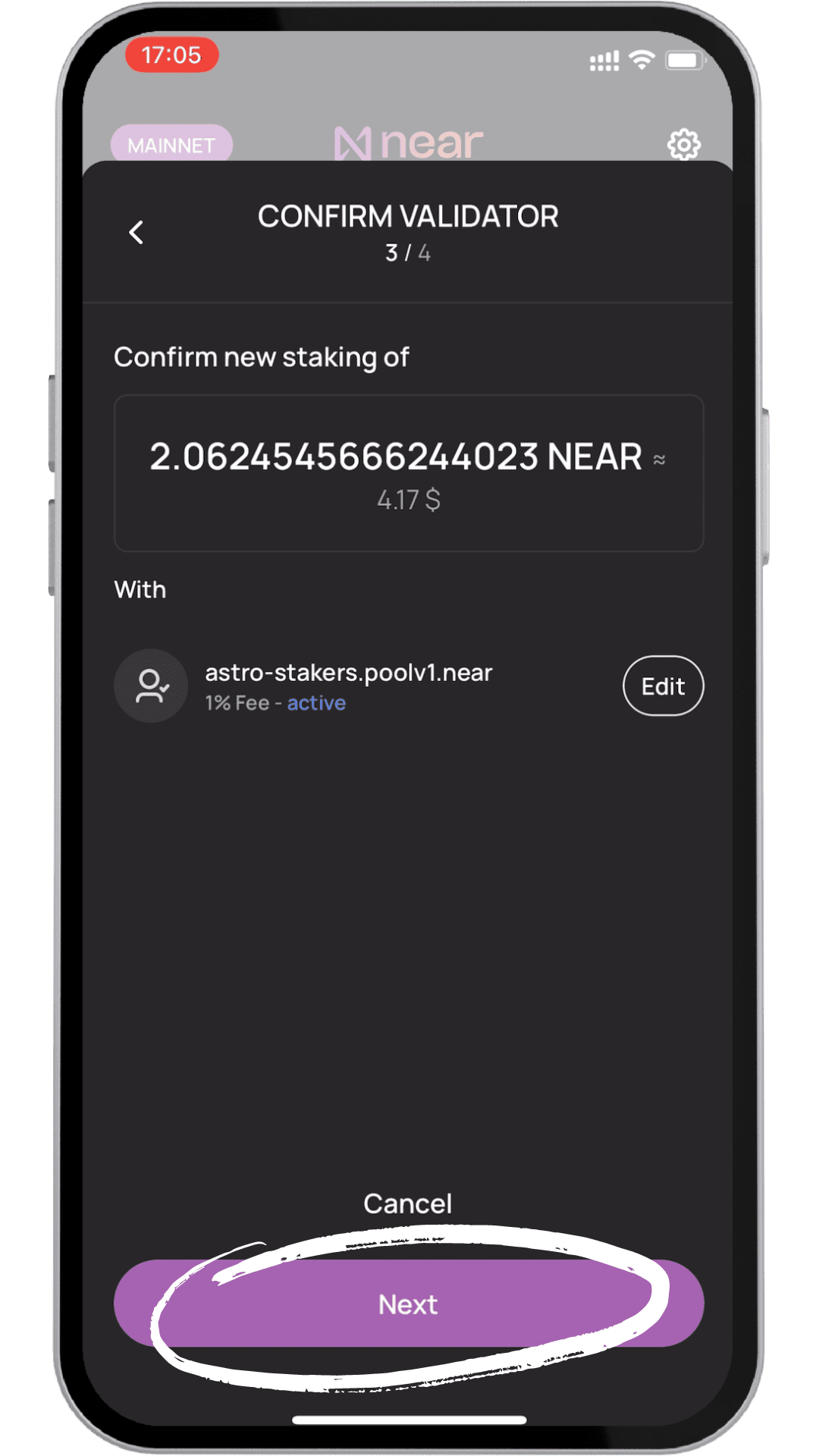
Source: NEAR Mobile Wallet
5. Approve the stake using your PIN or biometric authentication. Rewards begin accruing after one epoch, around 12 hours.
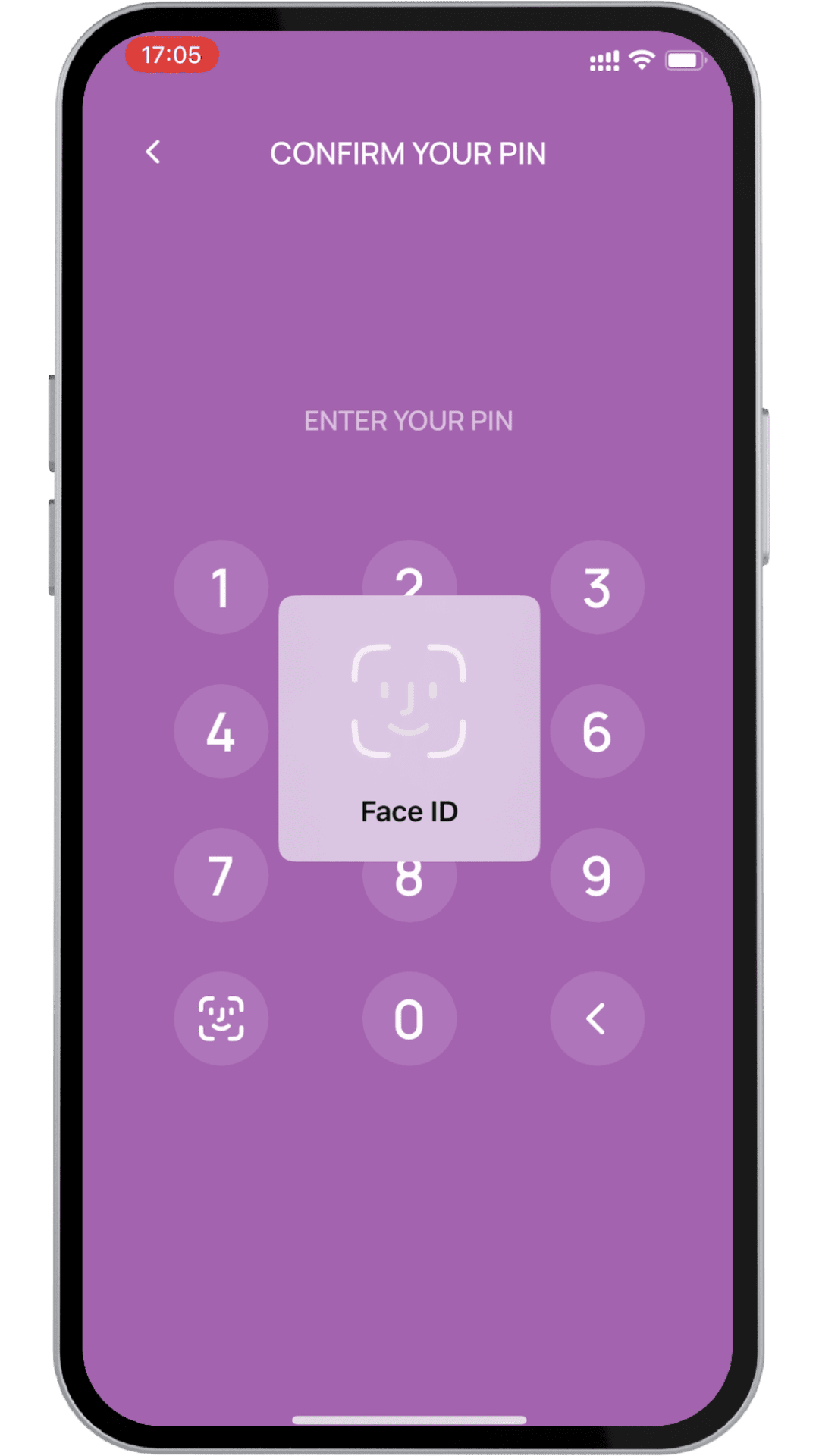
Source: NEAR Mobile Wallet
6. To stop staking, go to the Staking tab, tap Unstake, select the validator, enter the amount or choose Max, and confirm the transaction. Your NEAR will enter a 36–48 hour or 2–3 epochs pending release period, after which you can tap Withdraw to return the funds to your available balance.
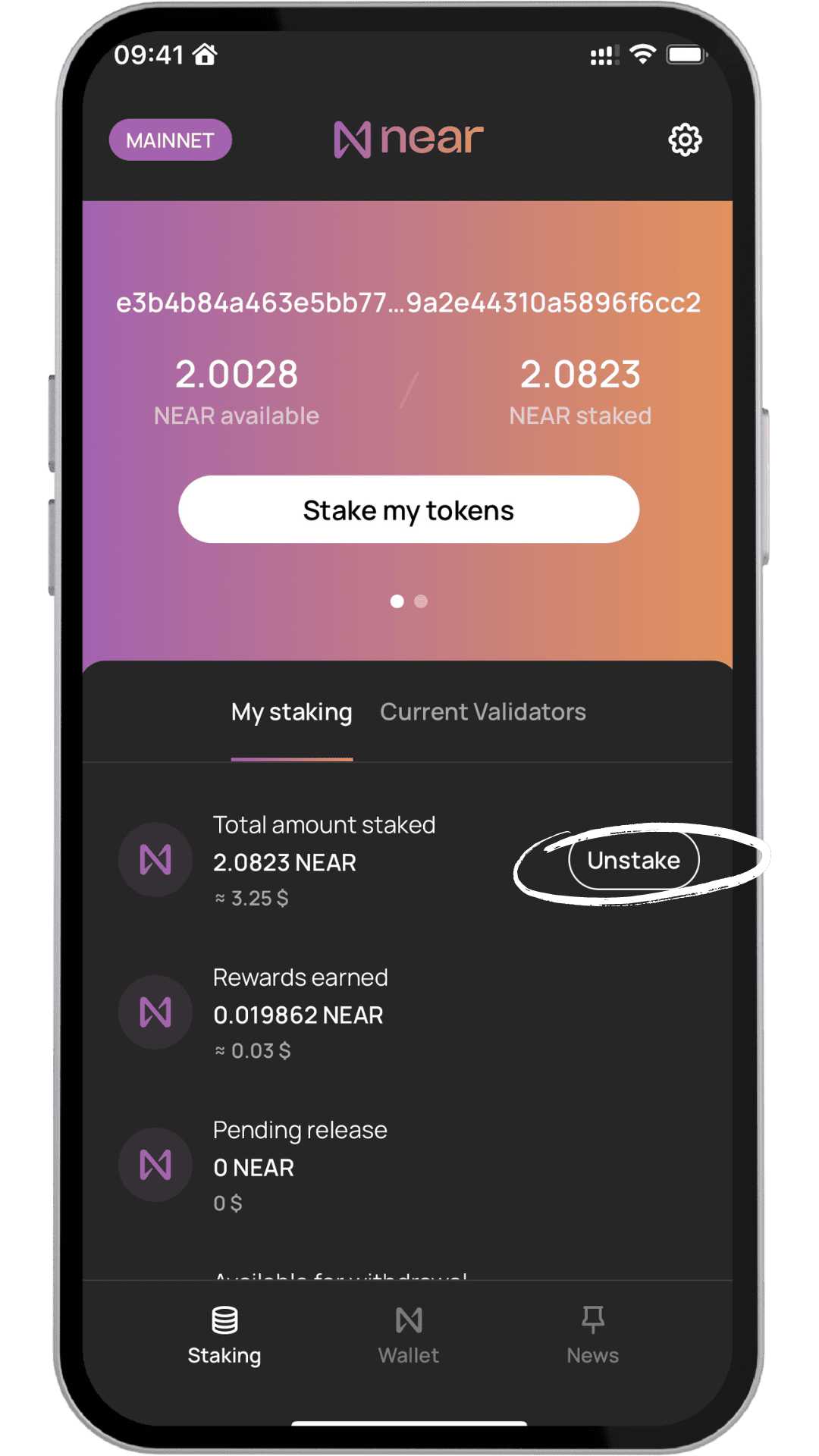
Source: NEAR Mobile Wallet
3. Advanced Staking: NEAR CLI & Hardware Wallets
Professional traders and developers often use the NEAR CLI (Command Line Interface) for direct interaction or a Ledger/Trezor for cold staking.
• CLI Command: near call <stakingPoolId> deposit_and_stake --amount <amount> --accountId <accountId> --gas=300000000000000
• Hardware Wallets: By connecting a Ledger to MyNearWallet, you can sign staking transactions while your private keys remain offline, providing the highest level of security for large holdings.
How to Stake NEAR (NEAR) Using a Ledger Hardware Wallet
Staking NEAR with a Ledger Nano S, X, or Stax offers maximum security by keeping your private keys offline. All staking actions must be physically approved on your device.
Step 1: Set Up Your Ledger
Connect your Ledger, open Ledger Live, and install the NEAR app from My Ledger. Open the NEAR app on your device.
Step 2: Add Your NEAR Account
In Ledger Live, go to Accounts, Add account, select NEAR Protocol, and sync your Ledger. Transfer NEAR from BingX to your Ledger NEAR address.
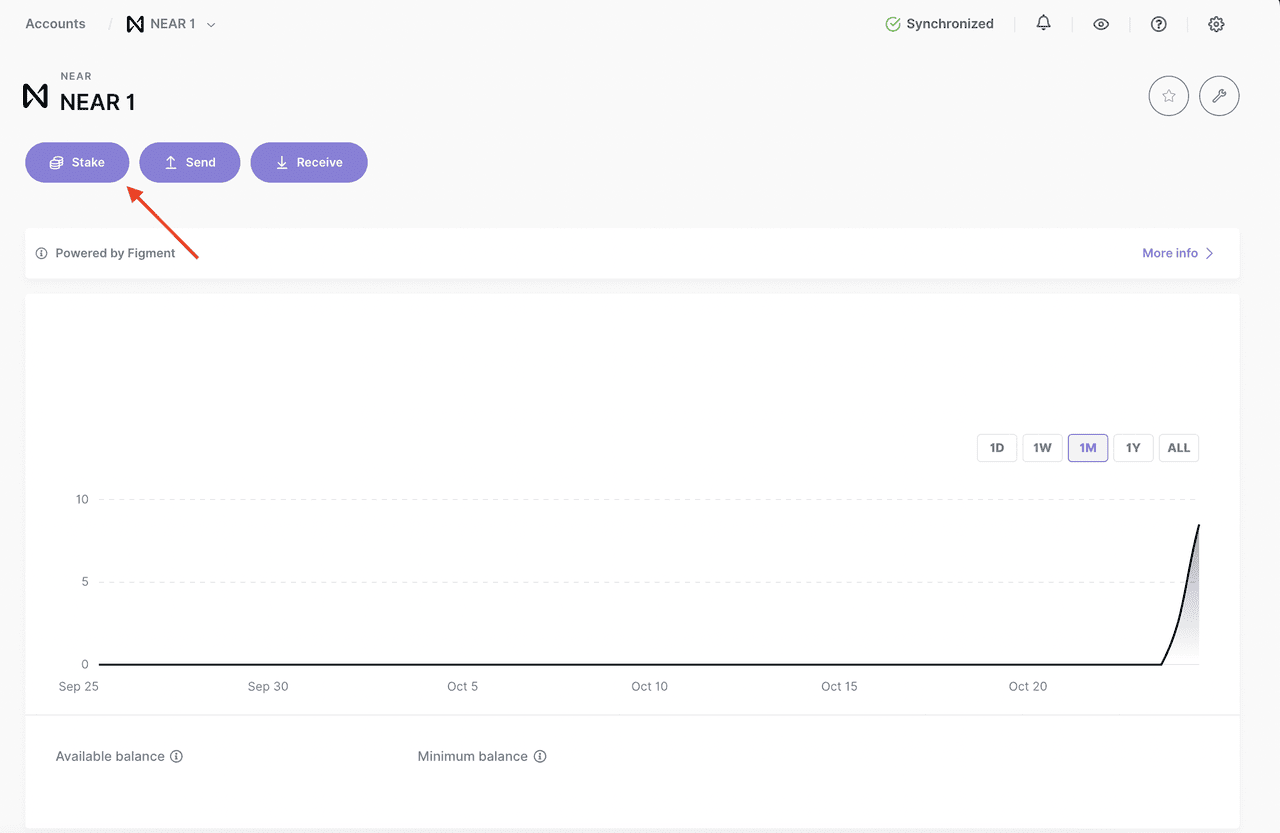
Source: Ledger support
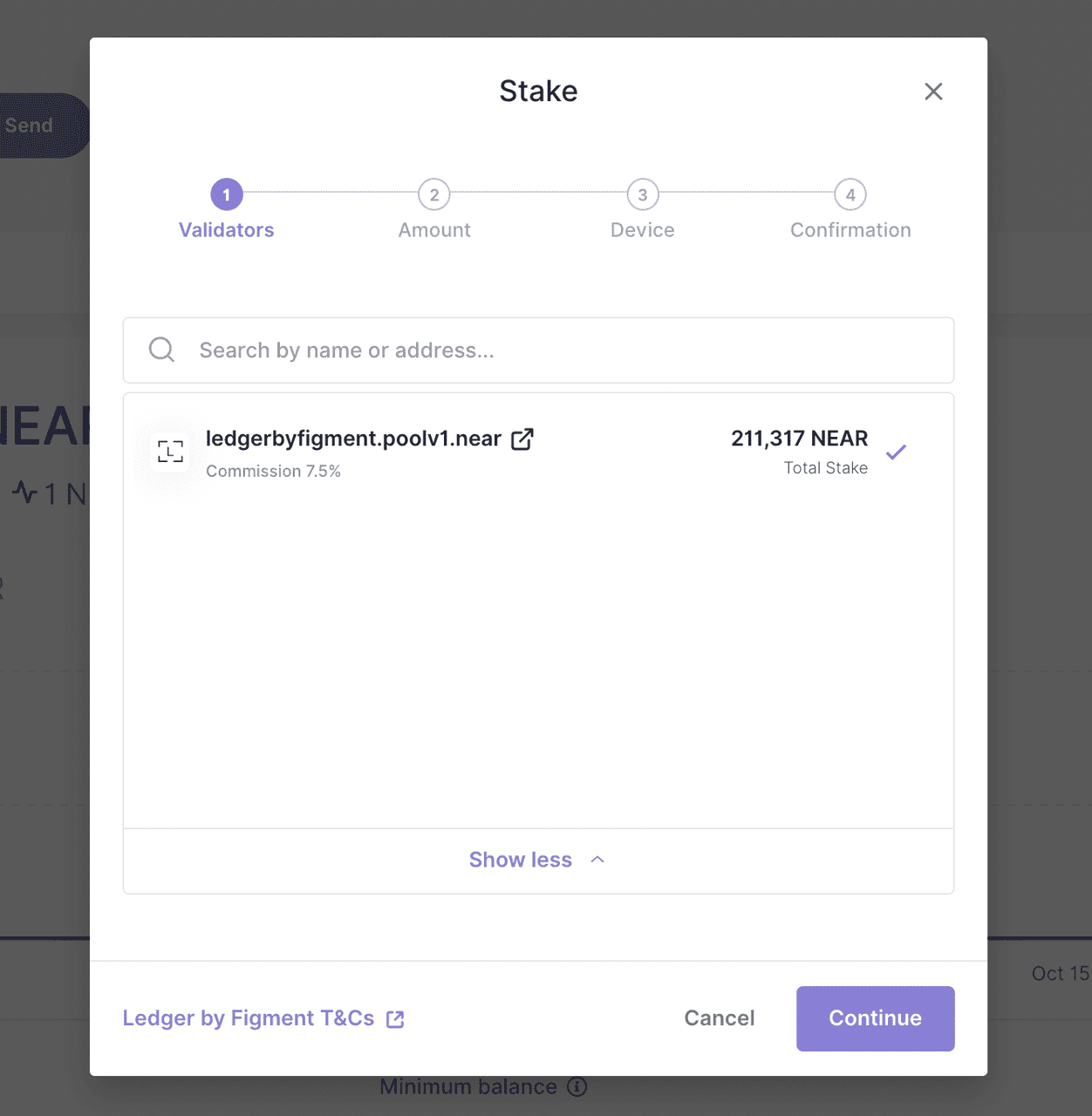
Step 3: Stake and Earn
Open your NEAR account, click Stake / Earn Rewards, choose a validator with high uptime and reasonable fees, typically 1%–7%, enter the amount, and confirm the transaction on your Ledger.
Source: Ledger support
How to Unstake and Withdraw NEAR Tokens on Ledger
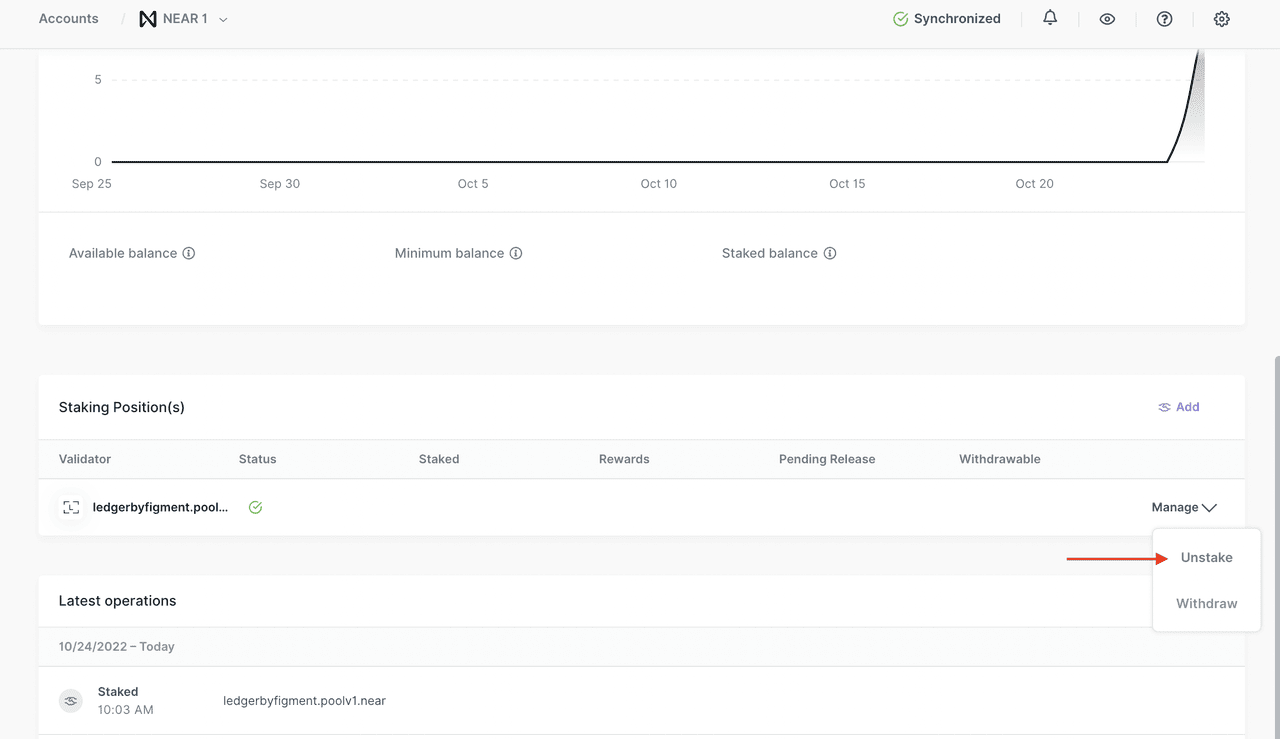
To stop staking, select Unstake from your staking position and confirm on your Ledger. After the 52–65 hour or 4-epoch waiting period, return to Manage and Withdraw, enter the amount, and approve the transaction. Your NEAR and rewards will then be available for use.
Source: Ledger support
Pro Tip: Keep around 0.25 NEAR in your available balance to cover future gas fees for unstaking or withdrawals.
How to Buy NEAR Protocol (NEAR) on BingX
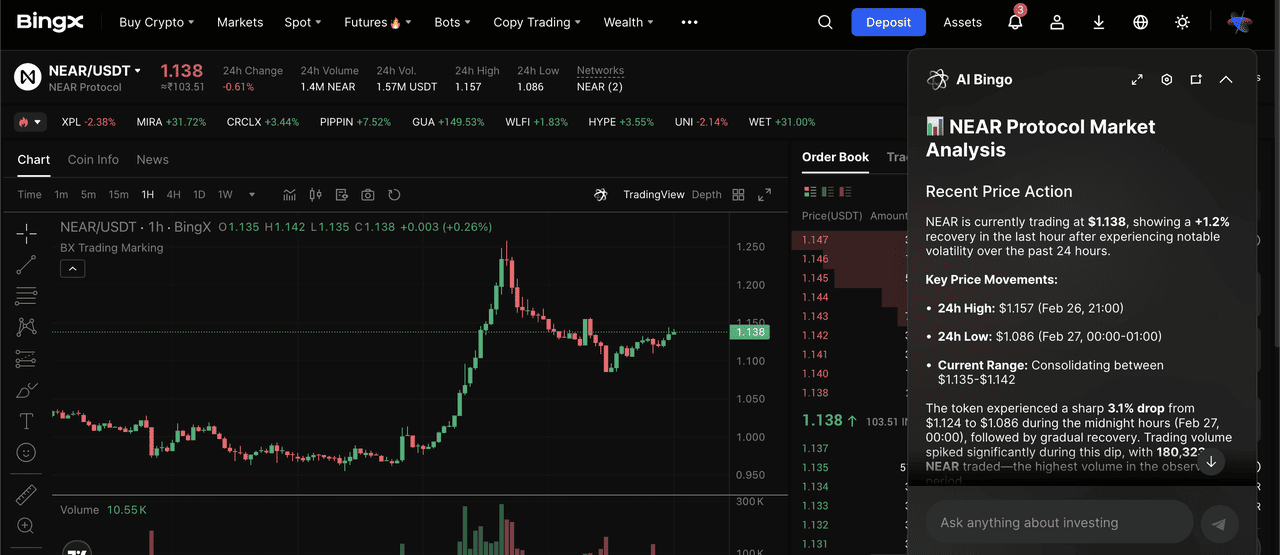
NEAR/USDT trading pair on the spot market featuring Bing AI analysis
Before staking, you can use BingX AI to analyze NEAR’s price action against competitors like Solana or Ethereum.
1. Fund Account: Use the Buy Crypto tab to purchase USDT via card or bank transfer.
2. Spot Market: Search for the NEAR/USDT pair.
3. Buy: Use a Limit Order to set a specific entry price or a Market Order for instant execution.
4. Transfer: Move the tokens to your Fund Account to subscribe to BingX Earn.
How to Manage Risks and Maximize Rewards When Staking NEAR
While NEAR Protocol is designed for security and scalability, adopting a strategic approach can help you protect your principal while squeezing every bit of yield from your holdings.
1. Strategic Liquidity Planning: Keep in mind that native unstaking requires an unbonding period of 4 epochs, roughly 52–65 hours. If you anticipate needing your funds for market volatility, consider using BingX Earn’s Flexible products, which offer faster redemption, or keep a portion of your NEAR unstaked to maintain immediate liquidity.
2. The Fee vs. Reliability Trade-off: While 0% commission validators are tempting for maximizing short-term rewards, established validators charging 5–10% often reinvest those fees into Tier-1 server infrastructure and insurance funds. Selecting a Verified validator with a proven track record reduces the risk of missing rewards due to node downtime.
3. Active Reward Management (Pinging): In the NEAR ecosystem, staking rewards are automatically compounded, but your displayed balance may appear stale if the pool hasn't been interacted with recently. Periodically pinging the pool, a simple, low-gas transaction, refreshes the smart contract state, ensuring your rewards are accurately reflected and realized on-chain.
4. Diversification: Avoid all-in delegation. By splitting your NEAR across 2–3 different staking pools or combining BingX Earn with native Ledger staking, you mitigate the risk of a single validator's technical failure impacting your entire passive income stream.
Final Word: Should You Stake NEAR Protocol in 2026?
Staking NEAR in 2026 remains one of the most balanced risk-reward opportunities in the Layer-1 space. With BingX Earn, beginners can capture a high 10% APR without worrying about technical maintenance. For power users, the depth of the NEAR ecosystem allows for complex strategies involving storage staking and DeFi integration. As always, consider the 2-day lock-up period and market volatility before committing your capital.
Related Reading
FAQs on NEAR Protocol Staking
1. How long does it take to unstake NEAR?
It takes approximately 52 to 65 hours or 4 epochs for your NEAR to move from Staked to Available for withdrawal.
2. Is there a risk of slashing when staking NEAR tokens?
Currently, NEAR does not implement slashing for losing your principal, but if a validator goes offline, you will earn zero rewards during that period.
3. What is the difference between staking and storage staking on NEAR Protocol?
Staking earns you rewards for securing the network. Storage staking is a deposit required to keep data like an NFT or smart contract on the blockchain.
4. Can I stake NEAR on my phone?
Yes, wallets like NEAR Mobile and the BingX App allow for full staking management on iOS and Android.
5. How often are NEAR staking rewards distributed?
Rewards are distributed every epoch, which occurs roughly every 12 hours.